CV-Transformer

Perfectly branded CVs in seconds, not hours

Skip the manual formatting. Our AI converts documents into your layout with data-driven accuracy. Skills are instantly aligned with the vacancy, leaving you with a perfect, ready-to-send profile.
CVs in your branding

Stop wasting valuable time on manual formatting. Our CV-Transformer optimizes candidates at lightning speed for every specific vacancy.

  • Anonymization possible

  • Transform resumes in just 2 minutes

  • Process personal data securely and 100% GDPR-compliant

  • Convert to any desired format (PDF, Word, etc.)

CVs in your house style

Stop wasting valuable time on manual formatting. Our CV-Transformer optimizes candidates at lightning speed for every specific vacancy.

  • Anonymization possible

  • Transform resumes in just 2 minutes

  • Process personal data securely and 100% GDPR-compliant

  • Convert to any format (PDF, Word, etc.)

Match the profile to the job.

Move beyond generic summaries. Our AI highlights the exact skills requested and generates a tailored pitch based on the candidate's actual data.

  • Match CVs directly with vacancy-keywords

  • Auto-enrich profiles with LinkedIn data

  • Increase placement rates with tailored pitches

  • Transform multilingual CVs

Match the profile to the job.

Move beyond generic summaries. Our AI highlights the exact skills requested and generates a tailored pitch based on the candidate's actual data.

  • Match resumes to job keywords instantly

  • Auto-enrich profiles with LinkedIn data

  • Increase placement rates with tailored pitches

  • Transform multilingual CVs

And just like that!

Your candidates, perfectly presented.
Transform CVs into vacancy-specific profiles in your own branding within 2 minutes.

Product demo

01

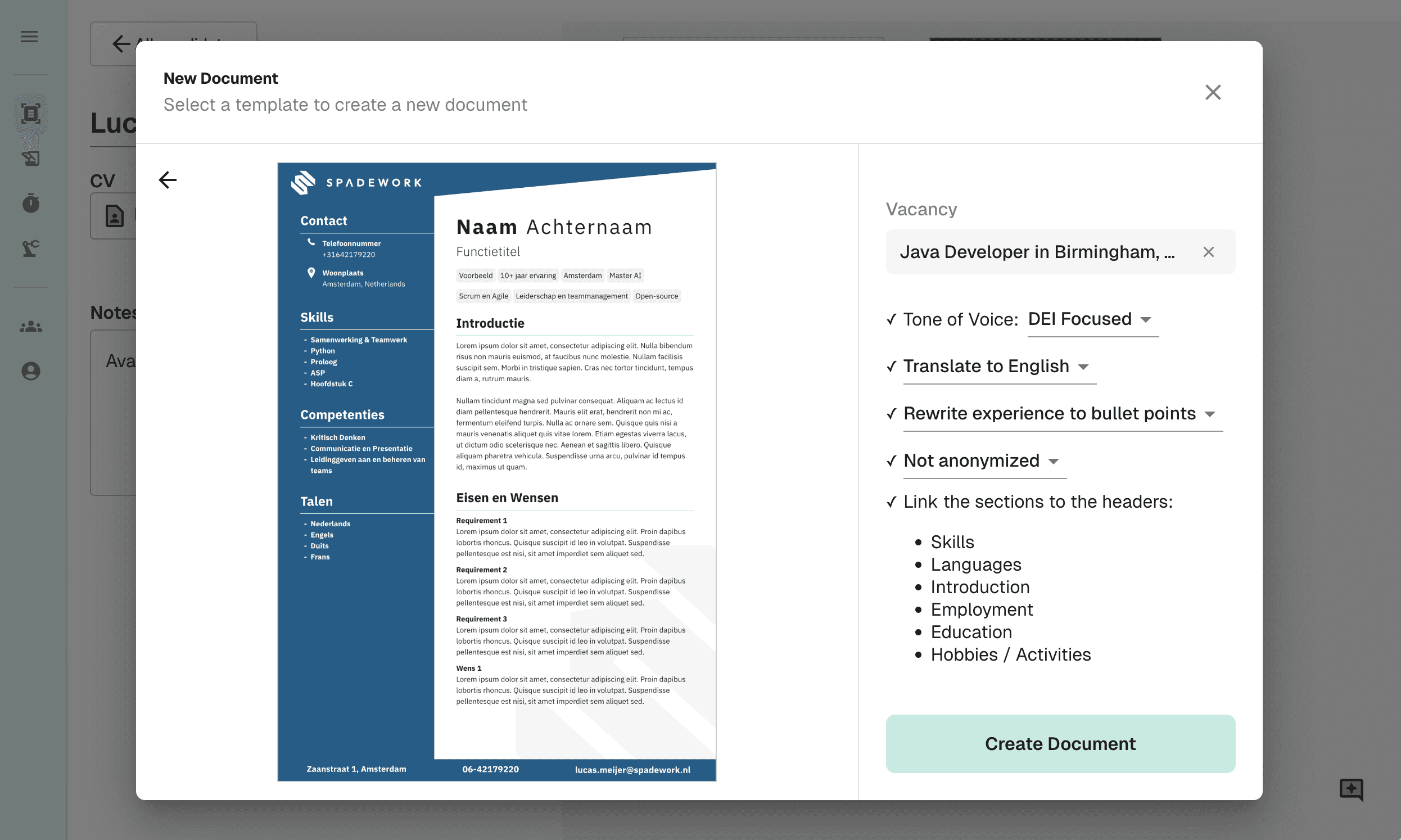
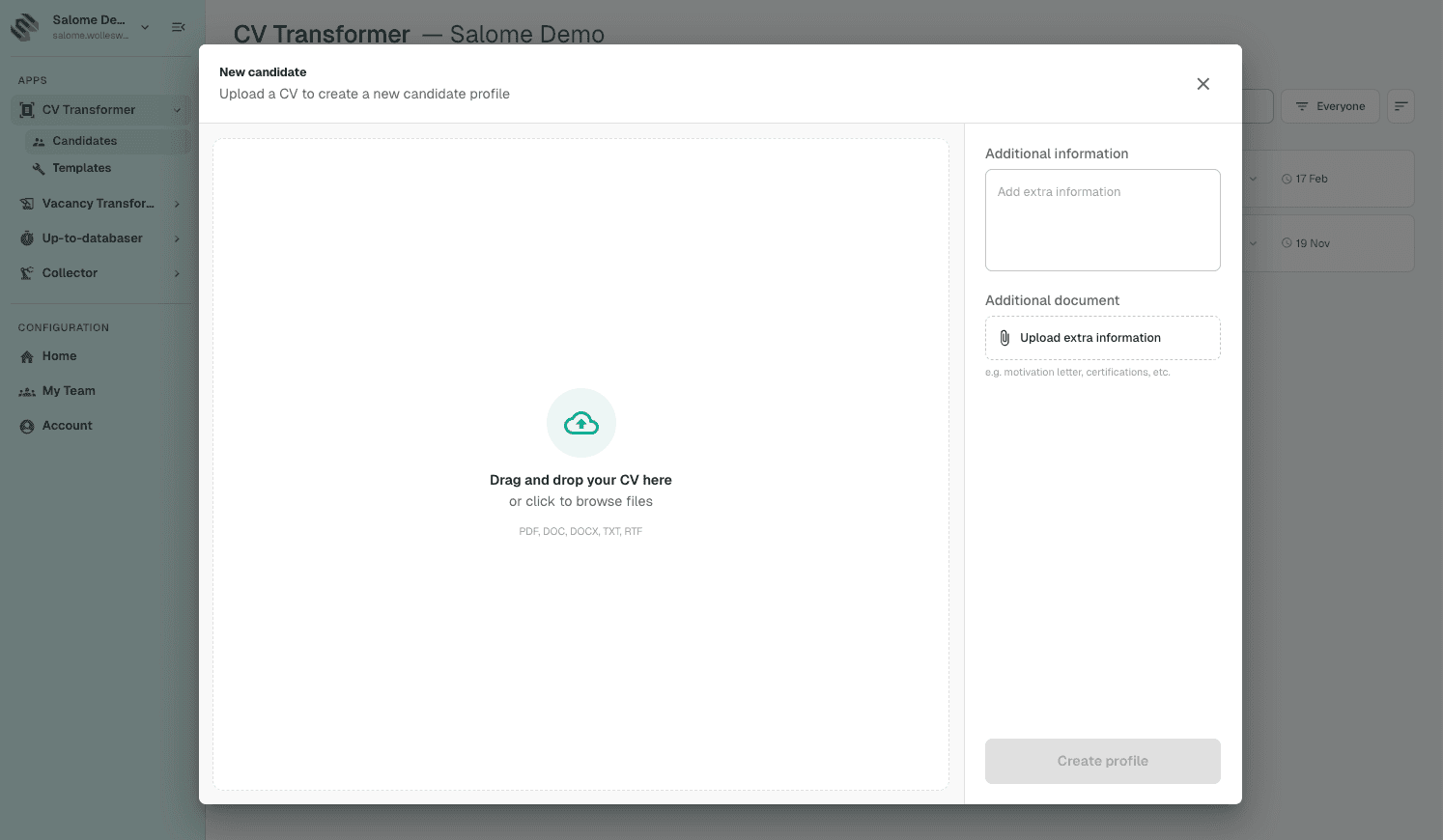
Upload a new profile

In this step, you upload the candidate profile (CV) and optionally add extra information before starting the transformation.

step image

02

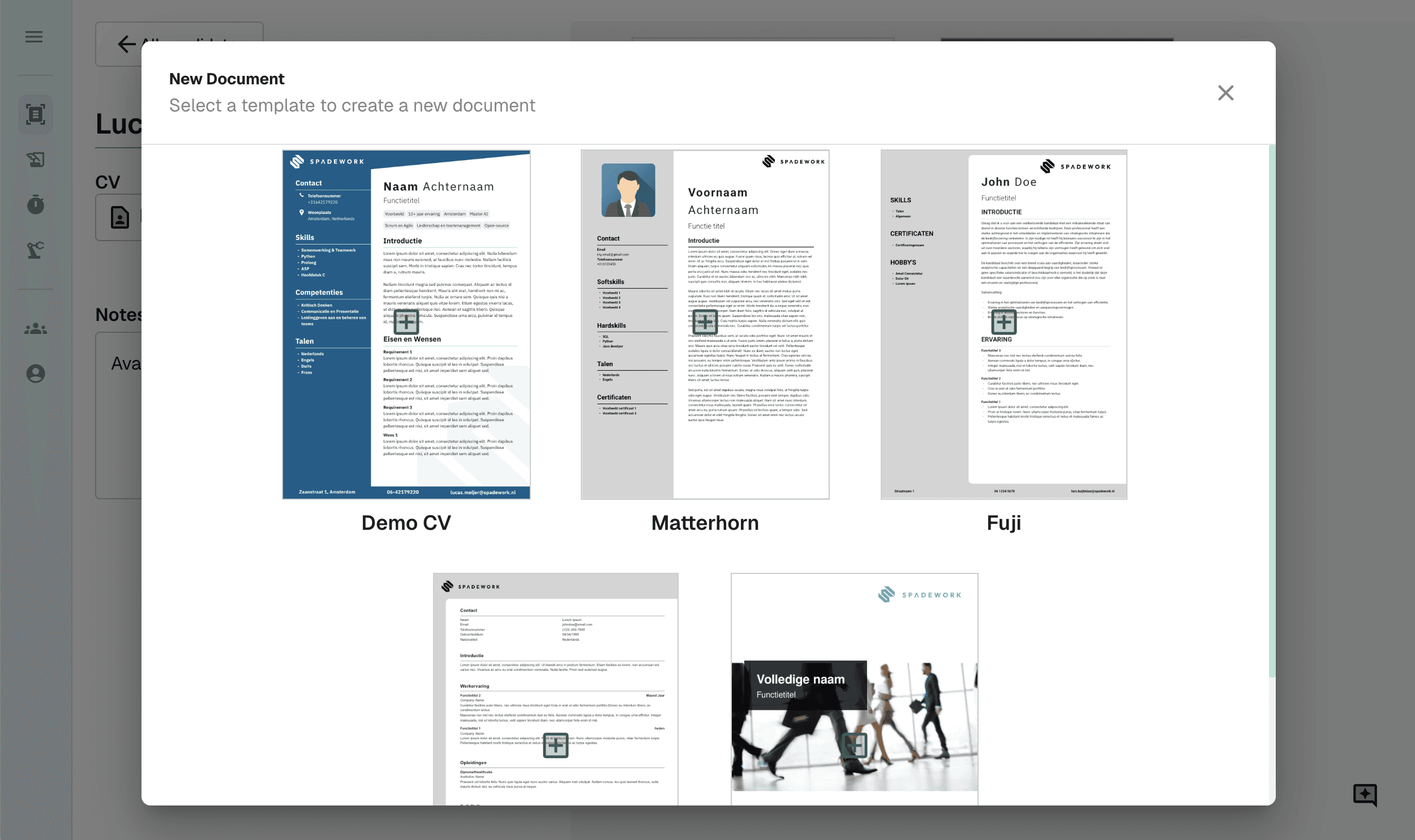
Choose your template

Choose one of our templates or create a template yourself using our Template Builder.

03

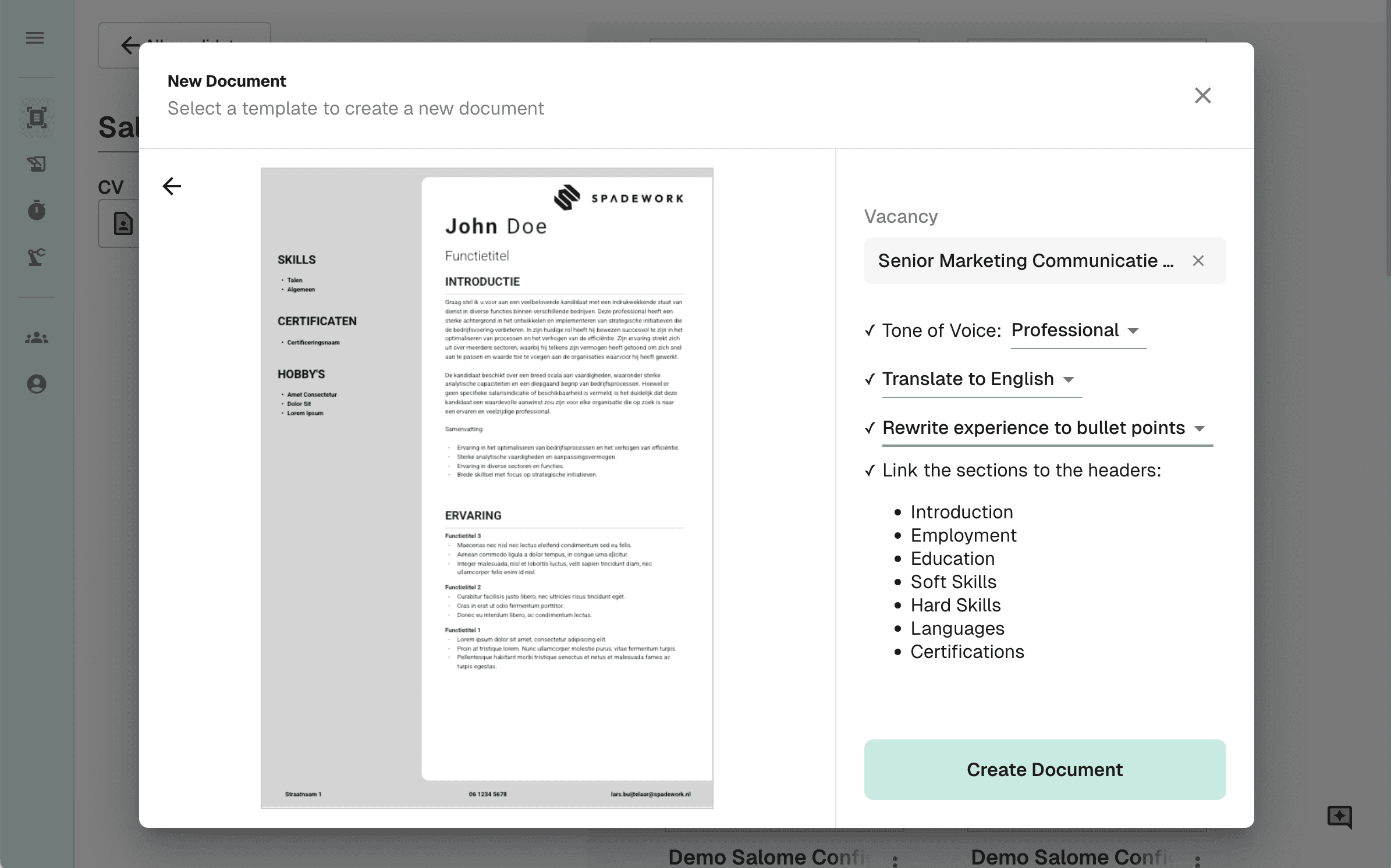
preferences

Optionally upload a Vacancy text to tailor the resume to the Vacancy. Then choose the tone, language, and format.

04

Transformation

Your resume will be ready in seconds.

05

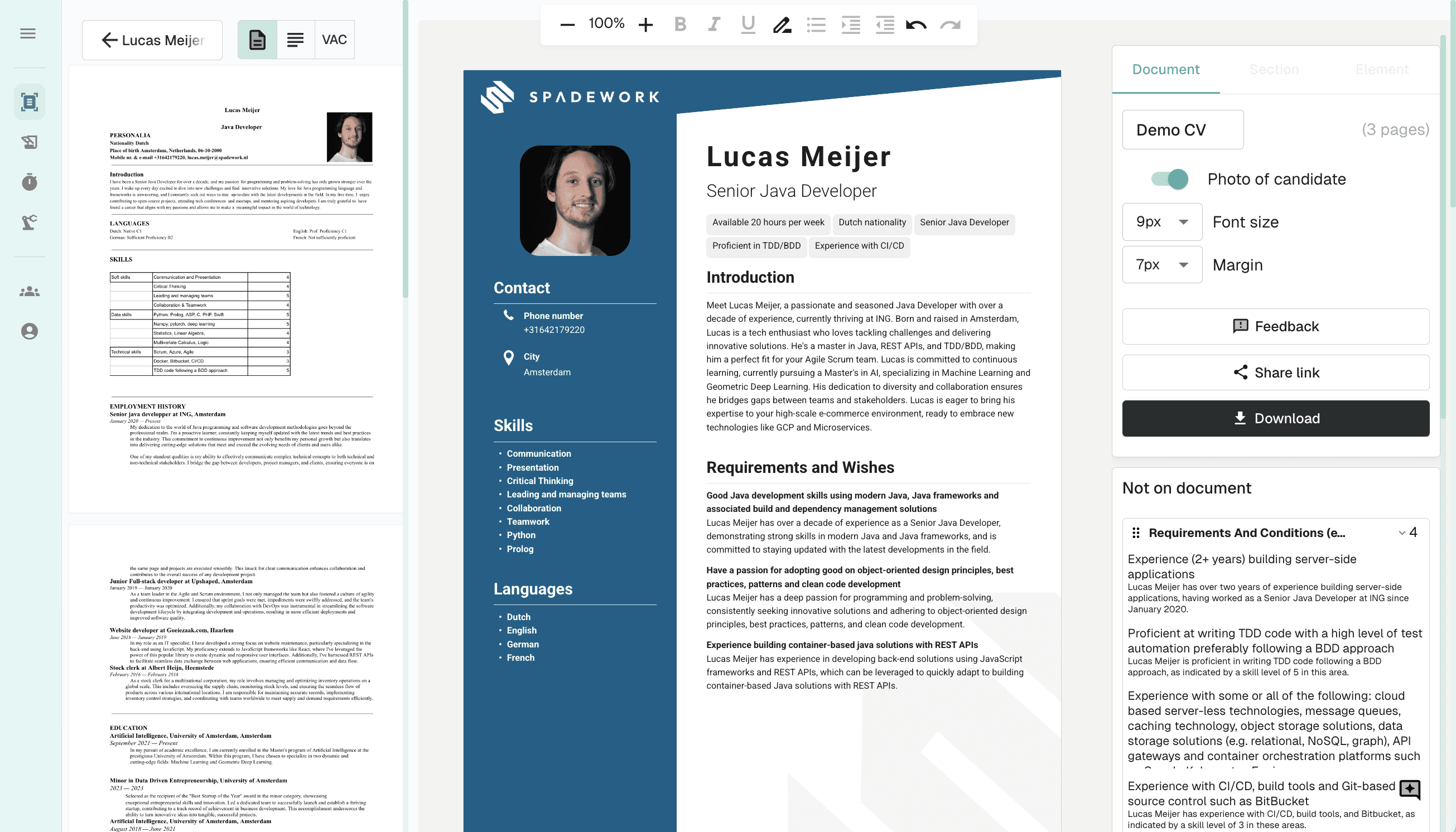
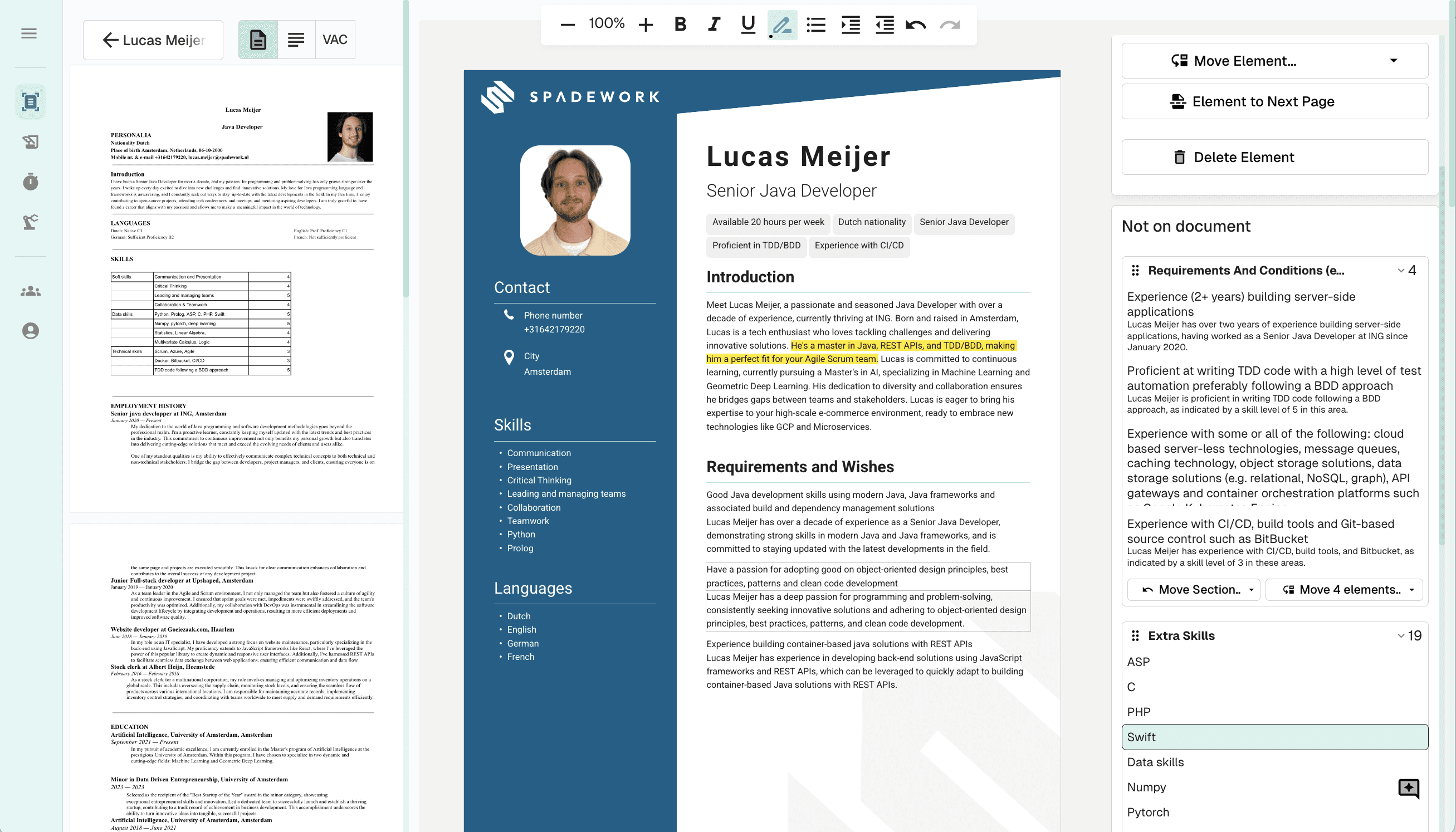
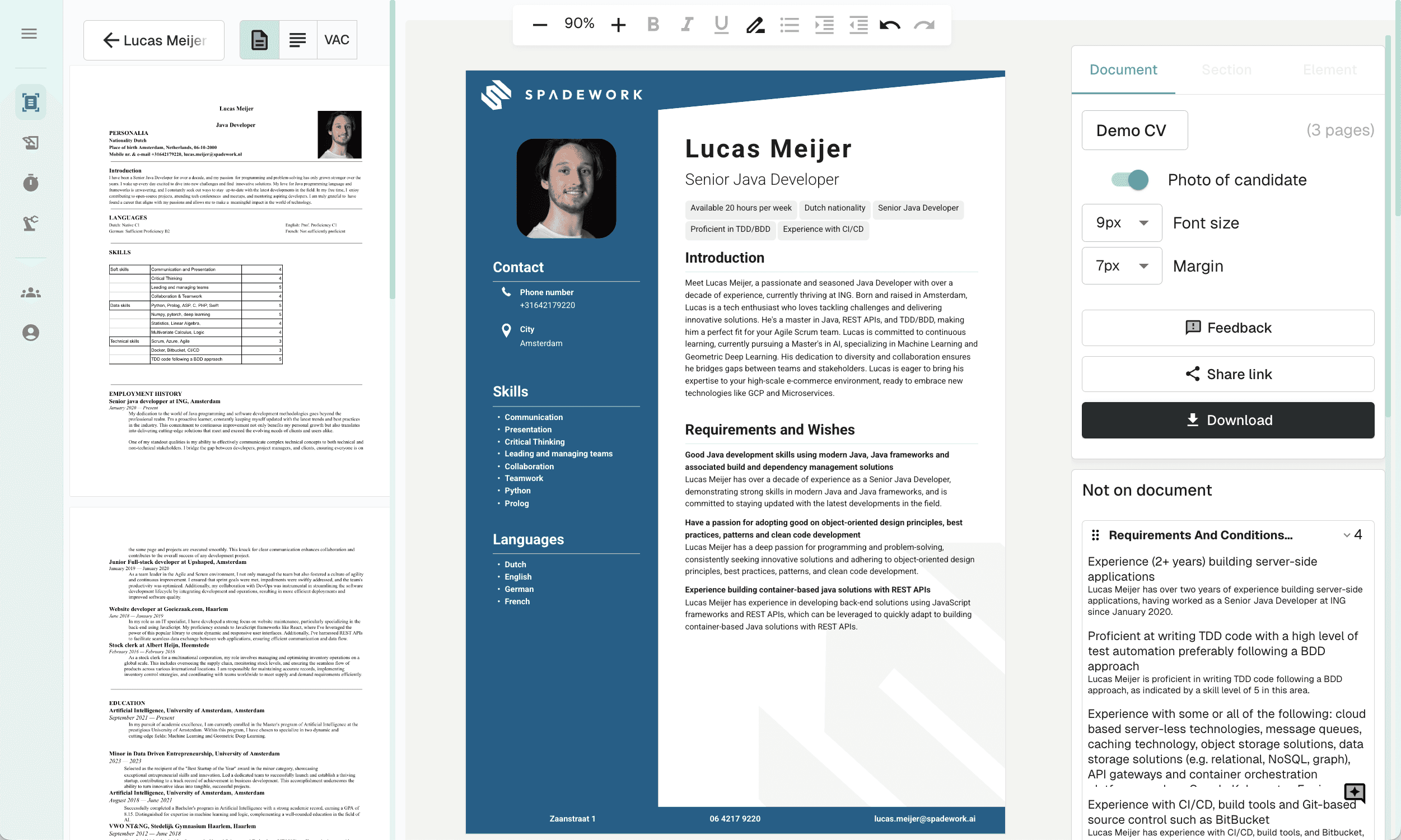
Editing

Take full control with an editor built specifically for recruiters. Move elements, change layouts, or rewrite sections instantly. Need a hand? Simply instruct the AI agent to handle the adjustments for you.

06

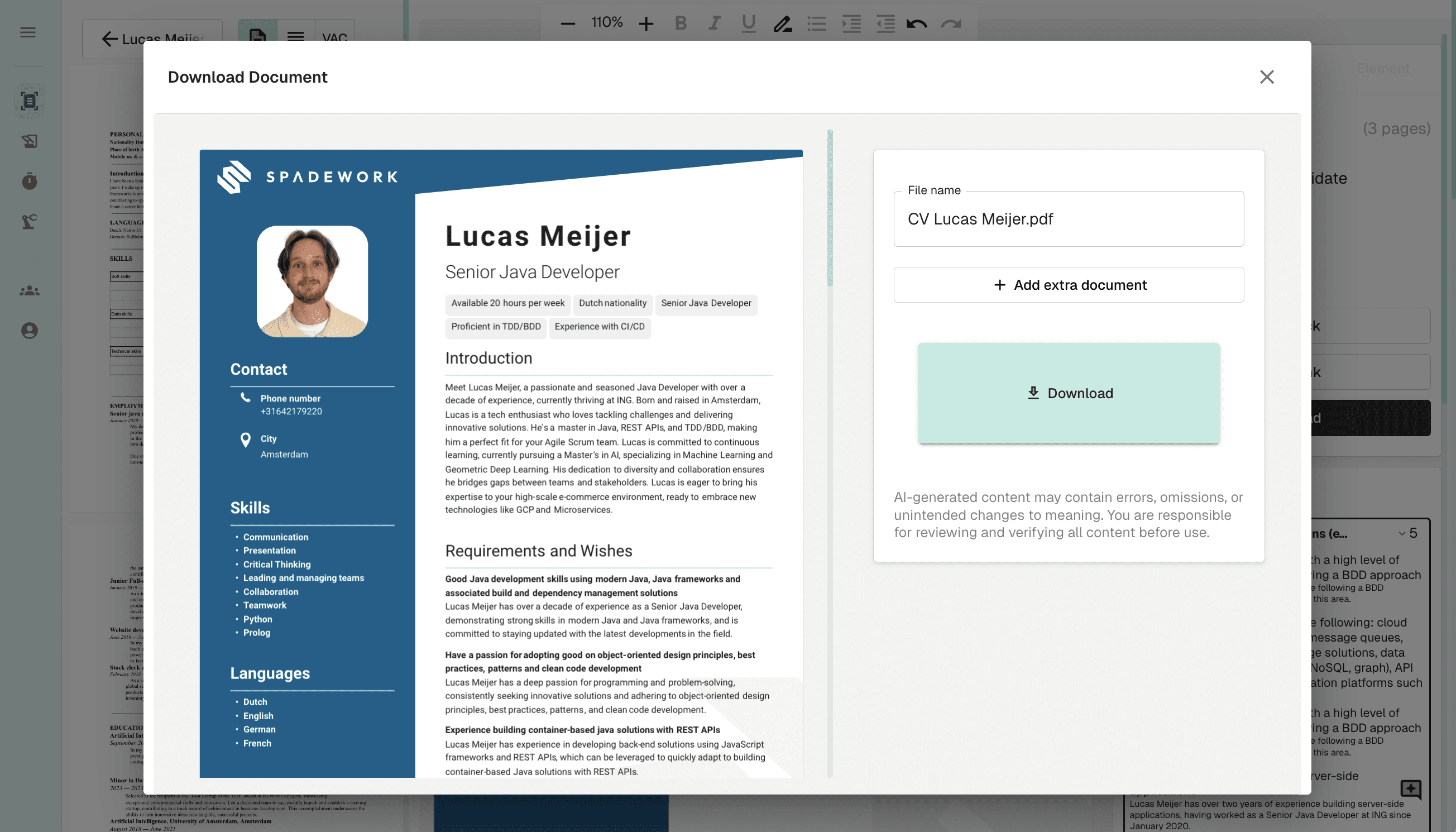
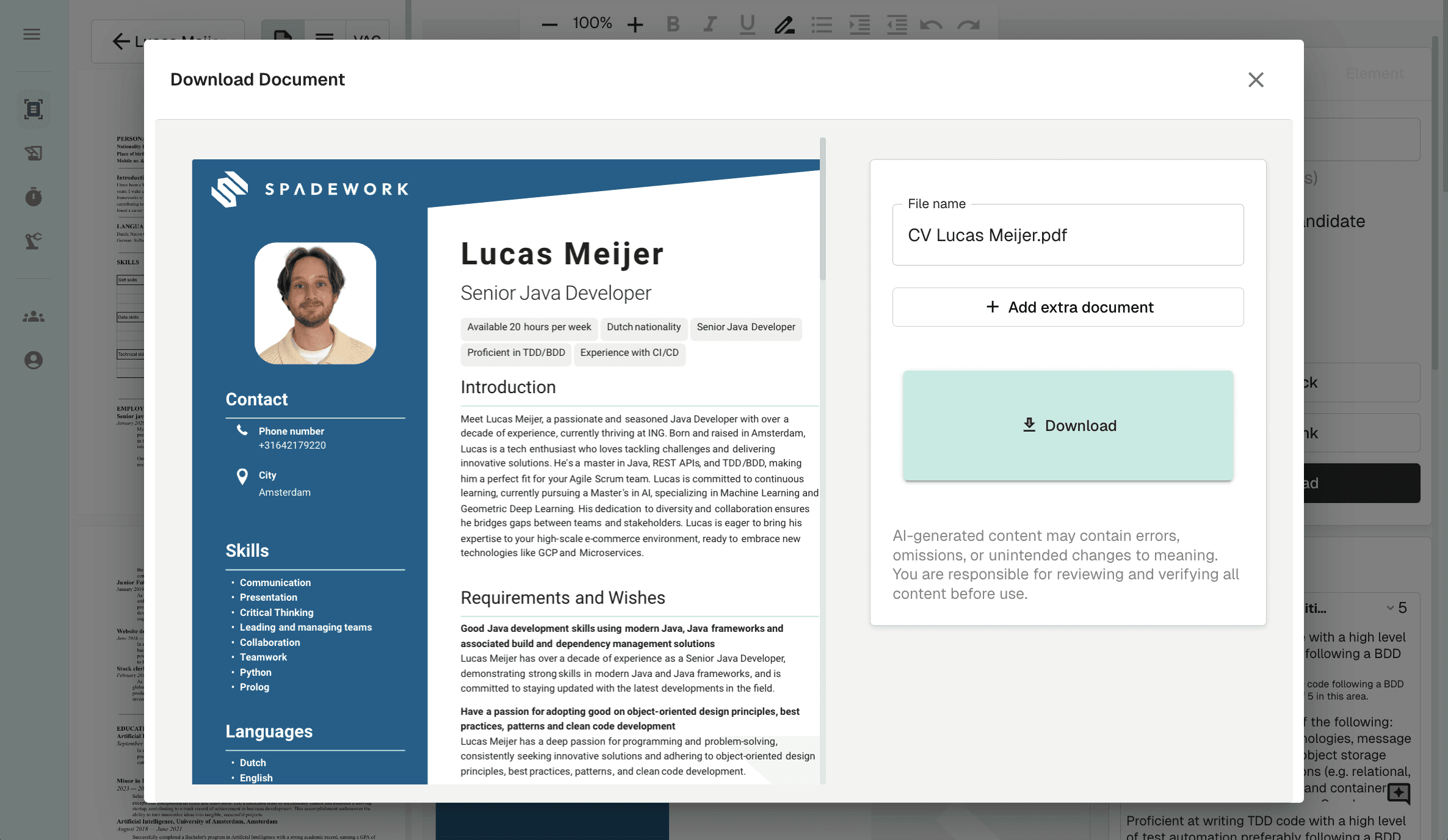
Save & Export

Done editing? With a simple button, you save the PDF and it is written back to your ATS.

And just like that!

Your candidates, perfectly presented.
Transform CVs into vacancy-specific profiles in your own branding within 2 minutes.

Product demo

01

Upload a new profile

In this step, you upload the candidate profile (CV) and optionally add extra information before starting the transformation.

step image

02

Choose your template

Choose one of our templates or create a template yourself using our Template Builder.

03

preferences

Optionally upload a Vacancy text to tailor the resume to the Vacancy. Then choose the tone, language, and format.

04

Transformation

Your resume will be ready in seconds.

05

Editing

Take full control with an editor built specifically for recruiters. Move elements, change layouts, or rewrite sections instantly. Need a hand? Simply instruct the AI agent to handle the adjustments for you.

06

Save & Export

Done editing? With a simple button, you save the PDF and it is written back to your ATS.

Experiences from practice

“The product simply works incredibly well. At times, we worry that competitors will start using it too.”

Willem Heutink - Head of Operations at Kayak

Hear from our users

“The product simply works incredibly well. At times, we worry that competitors will start using it too.”

Willem Heutink - Head of Operations at Kayak

Metrics

Driven to Make a Difference

0+

0+

Active users

0+

0+

Companies went before you

0%

0%

More efficient

0+

0+

Processed candidates

Seamless integrations

No stress, Spadework seamlessly integrates with any ATS.

Spadework icon
Placeholder logo
Placeholder logo
Placeholder logo
Placeholder logo
Placeholder logo
Placeholder logo
Placeholder logo
Placeholder logo
Placeholder logo
Placeholder logo
Placeholder logo
Placeholder logo
Placeholder logo
Placeholder logo
Good to know

Frequently asked questions.

Which files it handles, whether GDPR allows it, and what happens to your template. Short answers, no small print.

PDF, Word, and pretty much anything people send by email. CVs in multiple languages too, and you choose the language of the result.

Yes. Name, photo and contact details come out, everything else stays in, with one setting.

You switch it on per upload, or set it as the default for a client who works that way, so you never have to remember it.

Yes. Spadework works within your own database, on people who are there with consent, and it is built and hosted in the EU. Nobody outside your own network enters the system.

Nothing is pooled either. One agency's data never ends up with another.

No. Spadework has formal partnerships with OTYS, Carerix, Byner and Mysolution, and integrates with others including Bullhorn, Teamtailor and Yellowyard. If yours is not on the list, we look at it with you and get the integration built.

Without an ATS you upload your contacts and receive your opportunities by email.

Yes, in the template builder. Multiple templates are fine, one per client or one per sector for example.

You set font, colours, section order and logo once, and every profile you transform after that follows that template automatically.

Yes, with one click. The profile is saved as a PDF or Word file and written back to wherever you already work.

Spadework doesn't replace your ATS, it adds to it.

No. It reorders and rewrites what's there, it doesn't add to it. What it can't find, it leaves out.

And before anything goes out the door, you see the profile yourself first.

It disappears, and that's the point. A CV that arrives as a PDF with a photo that won't sit still goes out in your template: your font, your colours, your section order.

The content stays the candidate's, the layout becomes yours.

Always. The editor is built for recruiters, not designers: move a block, rewrite a line, swap the order.

Or tell the agent what needs to change and let it handle it. What you finally send stays your version.

Not answered here? We reply faster than you would expect, usually within 24 hours.

Get in touch


A personal walkthrough

See it first on your own data.

We look at your current workflow and show you live what is happening inside your database.

  • Free, no strings, thirty minutes
  • Live on your use case, not on a demo environment
  • A concrete number for your team, in hours per week

Lucas Meijer

COO & co-founder

Book a demo
Newsletter

What is new, and how to use it.

Once a month: new features, the agents we recommend right now, and short how-tos from agencies already running them.

One mail a month. Unsubscribe in one click.

© 2026 Spadework. All rights reserved.Privacy policyTerms of service
Good to know

Frequently asked questions.

Which files it handles, whether GDPR allows it, and what happens to your template. Short answers, no small print.

PDF, Word, and pretty much anything people send by email. CVs in multiple languages too, and you choose the language of the result.

Yes. Name, photo and contact details come out, everything else stays in, with one setting.

You switch it on per upload, or set it as the default for a client who works that way, so you never have to remember it.

Yes. Spadework works within your own database, on people who are there with consent, and it is built and hosted in the EU. Nobody outside your own network enters the system.

Nothing is pooled either. One agency's data never ends up with another.

No. Spadework has formal partnerships with OTYS, Carerix, Byner and Mysolution, and integrates with others including Bullhorn, Teamtailor and Yellowyard. If yours is not on the list, we look at it with you and get the integration built.

Without an ATS you upload your contacts and receive your opportunities by email.

Yes, in the template builder. Multiple templates are fine, one per client or one per sector for example.

You set font, colours, section order and logo once, and every profile you transform after that follows that template automatically.

Yes, with one click. The profile is saved as a PDF or Word file and written back to wherever you already work.

Spadework doesn't replace your ATS, it adds to it.

No. It reorders and rewrites what's there, it doesn't add to it. What it can't find, it leaves out.

And before anything goes out the door, you see the profile yourself first.

It disappears, and that's the point. A CV that arrives as a PDF with a photo that won't sit still goes out in your template: your font, your colours, your section order.

The content stays the candidate's, the layout becomes yours.

Always. The editor is built for recruiters, not designers: move a block, rewrite a line, swap the order.

Or tell the agent what needs to change and let it handle it. What you finally send stays your version.

Not answered here? We reply faster than you would expect, usually within 24 hours.

Get in touch
Seamless integrations

Seamless integrations

No stress, Spadework seamlessly integrates with any ATS.

Placeholder logo
Placeholder logo
Placeholder logo
Placeholder logo
Placeholder logo
Placeholder logo
Placeholder logo
Placeholder logo
Placeholder logo
Placeholder logo
Placeholder logo
Placeholder logo
Placeholder logo
Placeholder logo
Placeholder logo
Placeholder logo

Where time and quality make the difference

The quality, speed, and consistency of the CV you submit to a client largely determine whether you place a candidate. Yet teams still spend hours each week manually cleaning, reformatting, translating, and enriching CVs before they can even be sent out. The work piles up, it is error-prone, nobody enjoys doing it, and every day of delay reduces trust and placement chances.


The Spadework CV-Transformer removes that entire step. Raw CVs, in any format or language, are converted in minutes into a clean, uniform profile in your own house style, enriched with LinkedIn data and ready to write back to your ATS. You eliminate repetitive work, reclaim hours, and can submit more candidates to clients with confidence. Efficient for the team, cost-saving in practice.

Curious how it works? Schedule a demo with Lucas and get ahead of your competition.

01

Upload a new profile

In this step, you upload a candidate profile (CV) and optionally add extra information before transforming it.

step image

02

Choose your template

Choose one of our templates or create a template yourself using our Template Builder.

03

preferences

Optionally upload a Vacancy text to tailor the resume to the Vacancy. Then choose the tone, language, and format.

04

Transformation

Wait a maximum of 2 minutes

05

Editing

Take full control with an editor built specifically for recruiters. Move elements, change layouts, or rewrite sections instantly. Need a hand? Simply instruct the AI agent to handle the adjustments for you.

06

Save & Export

Done editing? With a simple button, you save the PDF and it is written back to your ATS.

Impress your Clients

Convert your candidate's CV into a sleek, uniform profile in minutes that your client can immediately work with.

Product demo

Hear from our users

“Spadework’s tools give us more time for conversations right away and help us work more efficiently every day.”

Willem Heutink - Head of Operations at Kayak

Match the profile to the job.

Move beyond generic summaries. Our AI highlights the exact skills requested and generates a tailored pitch based on the candidate's actual data.

  • Match resumes to job keywords instantly

  • Automatically enrich profiles with LinkedIn URL

  • Increase placement rates with tailored pitches

  • Transform multilingual CVs

CVs in your house style

Stop wasting valuable time on manual formatting. Our CV-Transformer optimizes candidates at lightning speed for every specific vacancy.

  • Anonymization possible

  • Transform resumes in just 2 minutes

  • Process personal data securely and 100% GDPR-compliant

  • Convert to any format (PDF, Word, etc.)